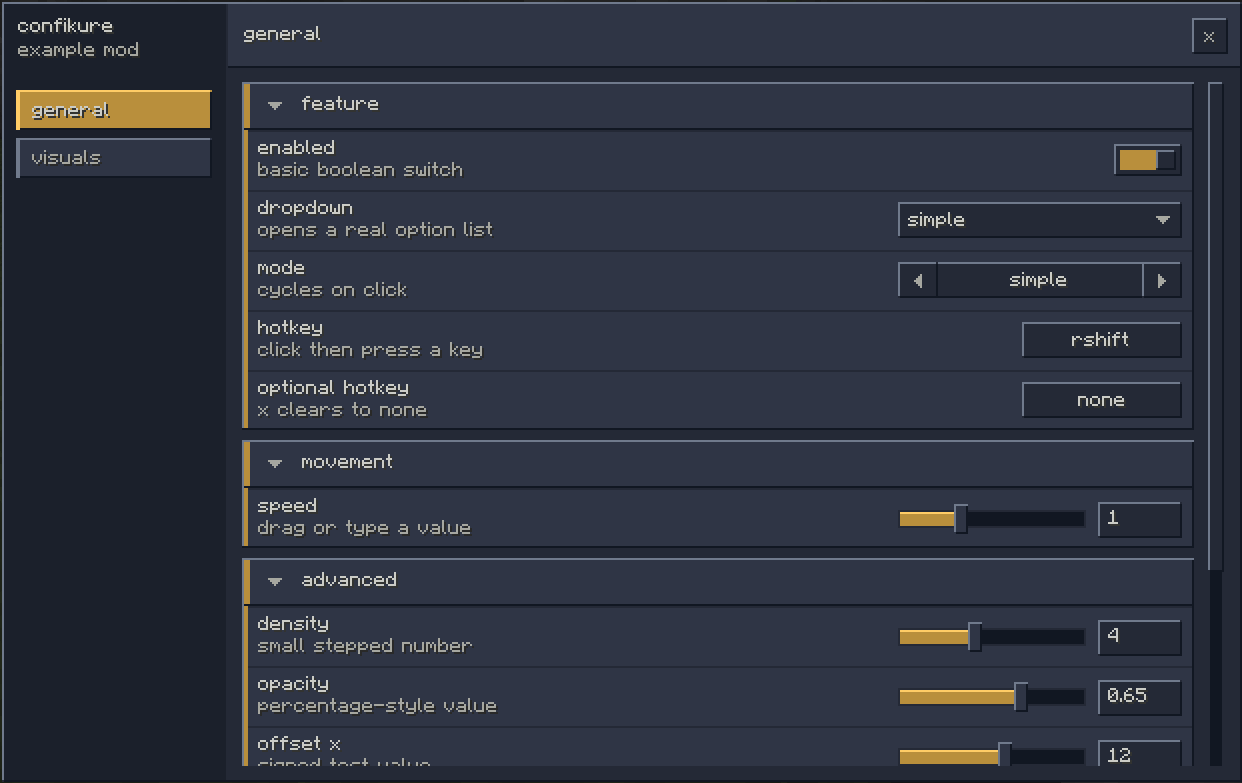
confikure is an annotation-driven config gui library for forge 1.8.9 mods. it turns plain java config objects into a searchable in-game settings screen and a json-backed config file, so mod settings can live next to the code that uses them.
why it exists
legacy forge mods usually end up choosing between hand-built GuiScreen code
and larger config libraries that bring extra dependencies, abstractions, and ui
that does not feel like minecraft. confikure keeps that surface small. you
define normal java objects, mark sections with @Category and @Group, expose
fields with @Option, then let Confikure.scan produce a ConfigDefinition
that can be rendered and persisted.
it supports booleans, numeric ranges, dropdowns, modes, argb colors, keybinds,
single-line and multiline text, info rows, search tags, and buttons through
annotations like @Range, @Dropdown, @Mode, @Color, @Keybind, @Text,
@Multiline, @Info, @SearchTag, and @Button. option id values are
generated from names by default, but shipped settings can pin explicit ids so
saved json keys stay stable across renames.
install
confikure is published as re.tsuku:confikure and is meant to be shaded into
the mod jar. relocation is recommended because 1.8.9 modpacks often load many
mods into the same classpath.
repositories {
    maven("https://maven.tsuku.re/releases")
}

val shadowModImpl by configurations.creating {
    configurations.modImplementation.get().extendsFrom(this)
}

dependencies {
    shadowModImpl("re.tsuku:confikure:1.0.0")
}

tasks.shadowJar {
    configurations = listOf(shadowModImpl)
    relocate("re.tsuku.confikure", "your.mod.deps.confikure")
}
basic shape
a config starts as a regular object graph. @Config names the root config,
@Category and @Group build the sidebar structure, and @Option exposes
fields as controls.
import re.tsuku.confikure.annotations.Category;
import re.tsuku.confikure.annotations.Config;
import re.tsuku.confikure.annotations.Option;
import re.tsuku.confikure.annotations.Range;

@Config(name = "examplemod", id = "examplemod", description = "examplemod settings")
public final class ExampleConfig {
    @Category(name = "general")
    public final General general = new General();

    public static final class General {
        @Option(name = "enabled")
        public boolean enabled = true;

        @Option(name = "speed", description = "movement multiplier")
        @Range(min = 0.0D, max = 3.0D, step = 0.25D)
        public double speed = 1.0D;
    }
}
when the mod needs a definition, it scans the object:
ConfigDefinition definition = Confikure.scan(new ExampleConfig());
from there the forge adapter can open the built-in screen with ForgeConfig, or
the core gui can be embedded into a custom GuiScreen.
external usage: openutils
OpenUtils is my own forge 1.8.9 mod, not a
tsukure project, but it is a useful real-world example of confikure in a larger
codebase. it shades re.tsuku:confikure:1.1.3, relocates it under
org.afterlike.openutils.lib, scans one root config object, loads values from
config/openutils/config.json, and saves whenever an option changes.
the root config wires existing feature instances into @Category and @Group
sections:
@Config(name = "OpenUtils", id = "openutils", description = "Mod settings", version = 1)
public final class OpenUtilsConfig {
    @Category(name = "Movement", order = 0)
    public final Movement movement;

    @Category(name = "Render", order = 2)
    public final Render render;

    @Category(name = "Client", order = 6)
    public final Client client;

    public OpenUtilsConfig(final FeatureHandler features) {
        this.movement = new Movement(features);
        this.render = new Render(features);
        this.client = new Client(features);
    }

    public static final class Movement {
        @Group(name = "Snap Tap",
                description = "Resolves simultaneous opposite movement inputs per axis.")
        public final NullMoveFeature nullMove;

        private Movement(final FeatureHandler features) {
            this.nullMove = features.getFeature(NullMoveFeature.class);
        }
    }
}
individual features own their own settings. for example, Snap Tap exposes
@Option, @Mode, and stable ids directly on the feature class:
public class NullMoveFeature extends ToggleableFeature {
    @Option(name = "Enable Snap Tap",
            description = "Resolves simultaneous opposite movement inputs per axis.")
    public boolean enabled;

    @Option(name = "Forward / Back SOCD",
            description = "Resolve forward/back when both are held.")
    @Mode(values = {"Last Input Priority", "Absolute Priority", "Neutral"})
    public String forwardBackMode = "Last Input Priority";

    @Option(id = "forward-back-priority", name = "Absolute Priority",
            description = "Direction kept when forward and backward are both held.")
    @Mode(values = {"Forward", "Backward"})
    public String forwardBackPriority = "Forward";
}
OpenUtils also uses runtime metadata on
the scanned ConfigDefinition. it marks the absolute-priority fields as
conditional with visibleWhen, binds listeners to every option, and saves after
changes:
this.config = new OpenUtilsConfig(OpenUtils.get().getFeatureHandler());
this.definition = Confikure.scan(this.config);

final ConfigOption forwardBackPriority =
        this.definition.option("forward-back-priority");

if (forwardBackPriority != null) {
    forwardBackPriority.visibleWhen(snapTap::showsForwardBackPriority);
}
that leaves the mod-specific screen free to focus on layout and rendering while confikure owns scanning, state, option listeners, and json persistence.